In these kinds of posts, I’ll be discussing more of my technical conquests. So if that sounds dreadfully boring to you, take a look here for more of the marketing side of this post.
Boy, do I both love and hate Javascript. It’s easy to learn but impossible to master. It breaths incredible flexibility and power into your website, but only if you know how to work around Javascript’s quirks. As a programmer, I was trained in more procedural languages while Javascript is a blend of procedural and functional. Nerd speak aside, I’m really lamenting my lack of a friggin’ ‘pause execution’ button.
I wanted to make my hoverable images on my service page fade in for 2 seconds, then out for 2 seconds – one at a time. It probably makes more sense to look at it, so check it out here.
Now that you’ve seen it, lets get the code out of the way.
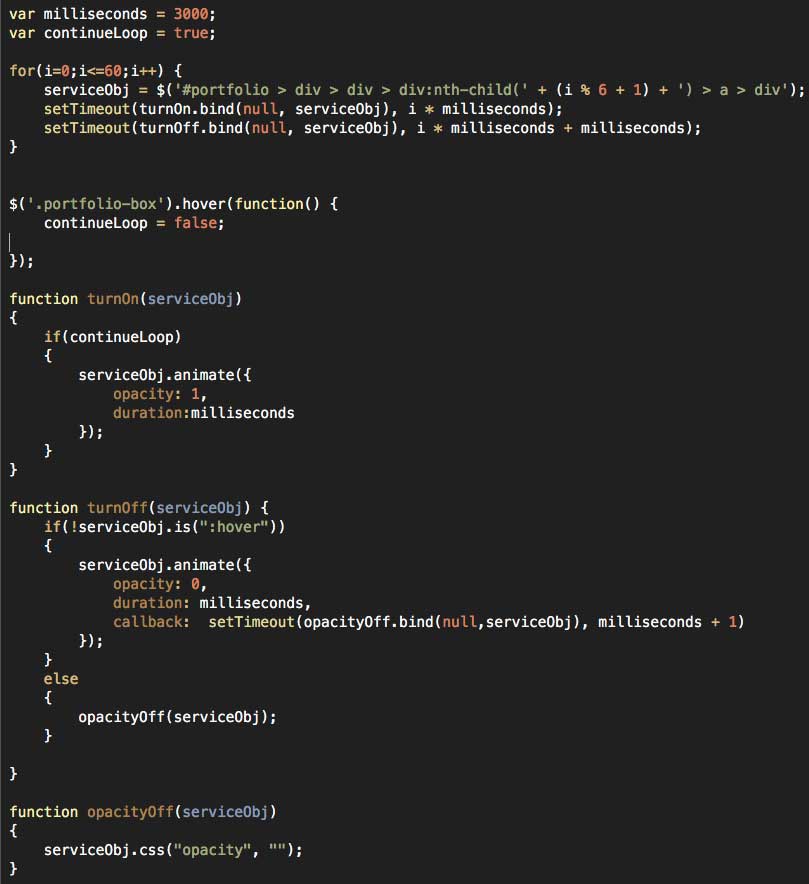
Now I’m going to bullet out some learnings from writing this jank:
- When dealing with issues of timing in Javascript, you have to remember that the browser is going to rip right through your code, doing all the things you want in a particular timed sequence almost simultaneously. You have to know how to space everything out timing wise, using control loops, timing functions, and the dreaded callback.
- To help make your life easier, establish your timing variables instead of hard coding them. The way I have written it, I can easily change the amount of seconds the transition takes by adjusting the millisecond variable.
- One fun thing I learned here was that calling setTimeout with a function that passes variables screws the whole thing up, causing everything to fire simultaneously or just plain not work. Using “bind” apparently circumvents that problem, allowing variables to be passed without issue. Whew.
- The for loop is set up to basically do 10 (60 / 6 = 10) iterations. To make sure my definition for serviceObj fires correctly, I had to bust out the mod operator so it would remain 1 – 6 regardless of where ‘i’ was.
- I have an event listener in place for a hover on a .porfolio-box class. When that happens, a “continueLoop” control variable is set to false. This halts the behavior after the visitor has hopefully realized that the boxes are mouse-over-able.
- I only perform the check for continueLoop in the ‘turnOn’ function. Checking in “turnOff” as well would mean previously lit tiles would stay lit.
- The ‘turnOn’ function is called every X seconds, where X is the iterative variable multiplied by the millisecond reference variable established in the beginning. The ‘turnOff’ function is called similarly, with extra time built in to account for turnOn’s time needed. Thank you Javascript for forcing me to work on my temporal skills.
- The ‘opacityOff’ function is meant to remove the inline style that jQuery adds when animating. The original hover behavior from this Bootstrap package relies on changing opacity with external CSS, and since inline styles take precedence over external CSS, the behavior didn’t work unless ‘opacity’ was cleared as an inline style. Once turnOff completes, opacityOff is called to clear the inline style so that hovering still works.
- If a person moused immediately over the panel that’s currently lighting up, the ‘turnOff’ function was still called, meaning that the panel disappeared even though the mouse was still on it. Not good. Yet another example of Javascript edge cases! Luckily, a quick check for the box NOT being hovered on before ‘turnOff’ is allowed to execute its contents seems to do the trick. This made sure that hovering mid-animation didn’t ruin everything. But of course it also WOULDN’T TURN OFF when the user moused out. So I threw an else condition in the turnOff function for when the box was hovered, setting the opacity to empty which allowed the CSS behavior to take over on mouse out. WHEW.
This was an interesting post for me to write. I certainly had fun with it, but I’m really not sure how much people may or may not be interested in super-geek code style posts. I’ll be keeping an eye on the analytics, so if you liked this, hit the refresh button a few times to inflate those numbers! I promise I’ll work on the lackluster formatting if I see enough interest. 🙂
PS – if you haven’t had a chance yet, check out the “marketing side” of this post.